
The easiest way to change the appearance of your WordPress website is by using a new theme. WordPress themes are like the style skin for your website. Your theme will give your site a unique look, and depending on what is included in the theme, it may also add custom features such as colors, fonts, menus, widgets, pages, post types, post formats, and more.
是的 - 您可以从旧博客导出内容,然后将其导入到新的 WordPress 博客中。有关基于旧博客平台的完整说明,请查看 WordPress导入内容的官方指南。
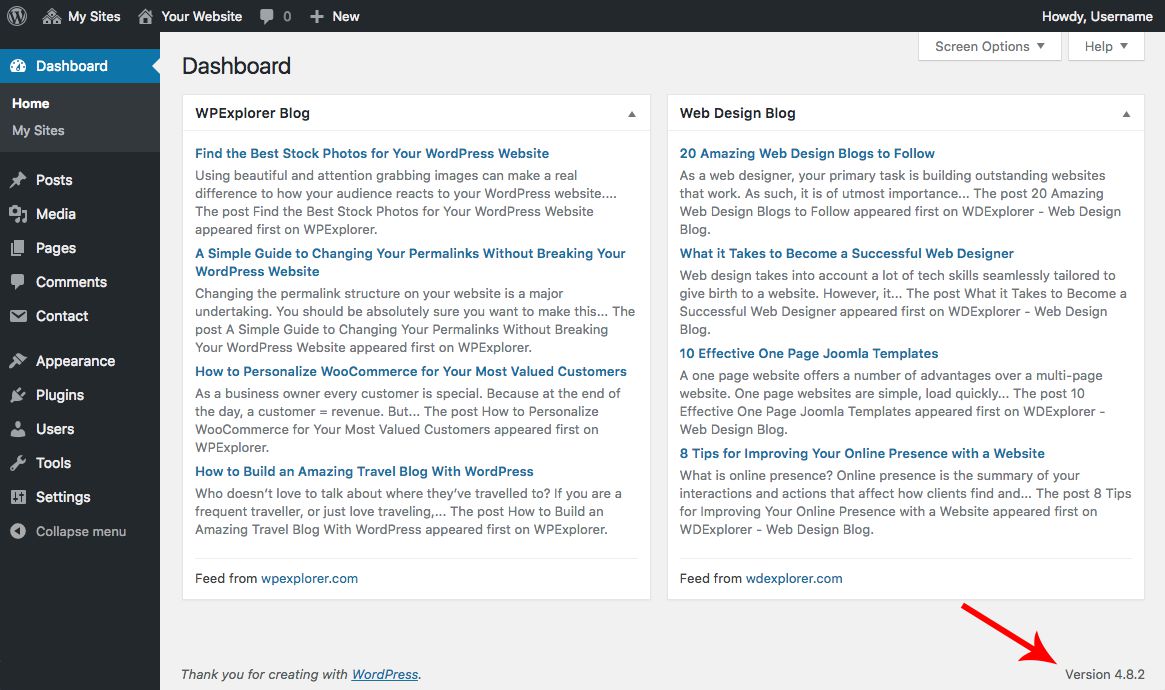
Not sure which version of WordPress your site is running? Simply log into your WordPress website, and you will see the current version number in the lower right corner of the dashboard.
Updating is easy, and you can see the updates in your WordPress dashboard. To install updates, click the refresh/update icon or go to Dashboard > Updates, then click the "Install Now" button. Once the installation is complete, you will see a confirmation screen welcoming you to the latest version of WordPress.
Yes, you can! With WordPress, you can choose to install it locally (on your computer) on almost any operating system. Depending on your skill level, you can use third-party software like Desktop Server or Local by Flywheel, or manually install WordPress using MAMP, WAMP, or LAMP.
WordPress 可以使用其5 分钟安装流程手动安装,但大多数托管公司都简化了这一过程。大多数共享托管计划都提供从主帐户页面或 cPanel 一键安装的功能。但如果您选择托管 WordPress 主机(如 WP Engine、Flywheel 或 Kinsta),则无需执行任何操作 - WordPress 已为您预先安装。
Absolutely not! Most WordPress users are not developers, as there are plenty of feature-rich themes and plugins that make it easier to modify your website without needing to learn complex CSS or PHP.
Maybe! Currently, there are WordPress translations available in 169 locales, with 10 of them being 100% up to date. You can check your language by visiting the WordPress Polyglots page, and you can even contribute to the translation process.
WordPress itself is a free, open-source web software, but to use it, you need to invest in a web hosting plan. You can find hosting services on shared hosting plans for as low as $1 per month, but we recommend spending a little more on a WordPress hosting plan to make it easier to set up and maintain your website.
WordPress is a popular content management system (CMS) that you can use to power your website on your own hosting plan. WordPress allows users around the world to create blogs, landing pages, online stores, forums, or other types of websites.
Confused about the difference between the two versions of WordPress? Check out the complete guide on WordPress.com vs. WordPress.org, and why we believe WordPress.org is the better choice.


